> ## Documentation Index
> Fetch the complete documentation index at: https://tbd-6fc993ce-cj-profile-state.mintlify.site/llms.txt
> Use this file to discover all available pages before exploring further.
# Web Bot Auth
> Cryptographically sign browser requests with Web Bot Auth
[Web Bot Auth](https://datatracker.ietf.org/doc/html/draft-meunier-web-bot-auth-architecture) is quickly becoming the standard way for agents to establish identity. That's why we've partnered with [Vercel](https://bots.fyi/d/kernel) to support Web Bot Auth on Kernel.
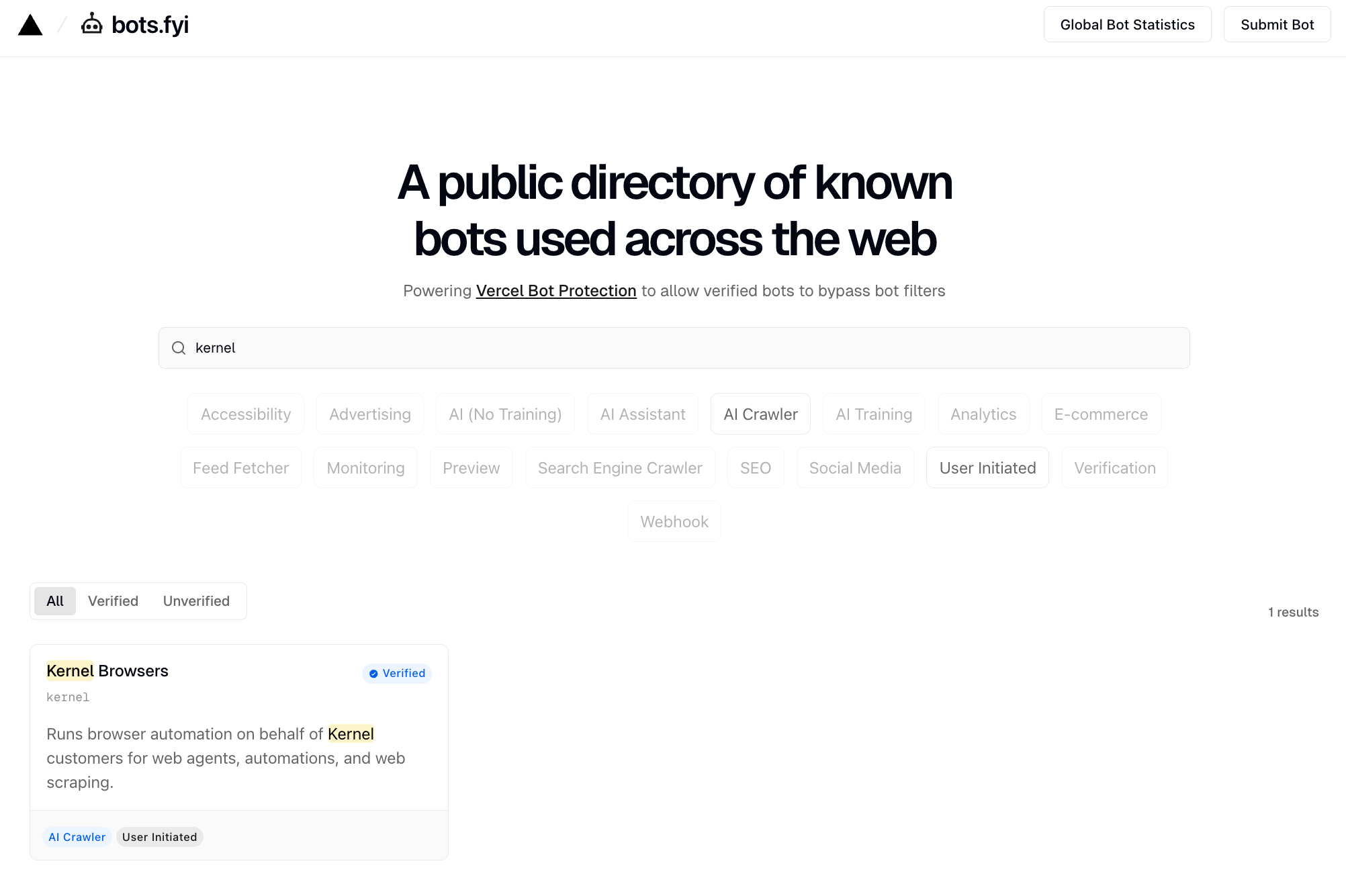 You can now cryptographically sign browser requests, so your agents can prove who they are to services like Vercel.
## How it works
Web Bot Auth works via a Chrome extension that intercepts all outgoing HTTP requests and adds cryptographic signature headers:
* **`Signature`**: The RFC 9421 signature of the request
* **`Signature-Input`**: Metadata about how the signature was created
* **`Signature-Agent`**: URL that points to your key directory
Platforms like [Vercel](https://bots.fyi/) or other hosting providers can verify these signatures against your public key, confirming that the request came from your authenticated agent.
## Quick Start with Test Key
The fastest way to get started is using a test key, which works with this [test verification site](https://http-message-signatures-example.research.cloudflare.com/).
### 1. Build the extension
Use the Kernel CLI to build the Web Bot Auth extension:
```bash theme={null}
kernel extensions build-web-bot-auth --to ./web-bot-auth-ext --upload my-web-bot-auth
```
The build command requires Node.js and npm to be installed on your system.
### 2. Create a browser with the extension
```bash CLI theme={null}
# Create a browser with the web-bot-auth extension
kernel browsers create --extension my-web-bot-auth
# The command outputs the browser ID and live view URL
# Open the live view URL in your browser, then navigate to:
# https://http-message-signatures-example.research.cloudflare.com/
```
```typescript TypeScript theme={null}
import { Kernel } from "@onkernel/sdk";
import { chromium } from "playwright";
const kernel = new Kernel();
// Create browser with web-bot-auth extension
const browser = await kernel.browsers.create({
extensions: [{ name: "my-web-bot-auth" }],
});
// Connect via Playwright
const pw = await chromium.connectOverCDP(browser.browser_url);
const context = pw.contexts()[0];
const page = context?.pages()[0] || await context.newPage();
// Navigate to a page - requests will be automatically signed
await page.goto("https://http-message-signatures-example.research.cloudflare.com/");
```
```python Python theme={null}
from kernel import Kernel
from playwright.sync_api import sync_playwright
kernel = Kernel()
# Create browser with web-bot-auth extension
browser = kernel.browsers.create(extensions=[{"name": "my-web-bot-auth"}])
# Connect via Playwright
with sync_playwright() as p:
pw = p.chromium.connect_over_cdp(browser.browser_url)
context = pw.contexts[0]
page = context.pages[0] if context.pages else context.new_page()
# Navigate to a page - requests will be automatically signed
page.goto("https://http-message-signatures-example.research.cloudflare.com/")
```
### 3. Verify it's working
Navigate to the [test site](https://http-message-signatures-example.research.cloudflare.com/) to verify your signatures are being accepted:
This site validates requests signed with the RFC9421 test key and shows whether the signature was verified successfully.
## Using Your Own Keys
For production use, you'll want to use your own signing keys instead of the test key.
### 1. Generate an Ed25519 key pair
Create a JWK file with your Ed25519 private key. The key must include both the public (`x`) and private (`d`) components:
```json my-key.jwk theme={null}
{
"kty": "OKP",
"crv": "Ed25519",
"x": "YOUR_PUBLIC_KEY_BASE64URL",
"d": "YOUR_PRIVATE_KEY_BASE64URL"
}
```
See [web-bot-auth documentation](https://github.com/cloudflare/web-bot-auth) for tools to generate Ed25519 key pairs.
### 2. Host your public key
For websites to verify your signatures, you need to host your public key at a well-known URL. Create a key directory at:
```
https://yourdomain.com/.well-known/http-message-signatures-directory
```
The directory should contain your public keys in JWKS format:
```json theme={null}
{
"keys": [
{
"kty": "OKP",
"crv": "Ed25519",
"x": "YOUR_PUBLIC_KEY_BASE64URL",
"kid": "YOUR_KEY_ID"
}
],
"purpose": "your-bot-purpose"
}
```
### 3. Build with your key and hosted key directory
```bash theme={null}
kernel extensions build-web-bot-auth \
--to ./web-bot-auth-ext \
--key ./my-key.jwk \
--url https://yourdomain.com/.well-known/http-message-signatures-directory \
--upload my-web-bot-auth
```
### 4. Register with Vercel and other Web Bot Auth-aware directories (optional)
If you want Vercel-protected sites to recognize your agent, you can register your key directory with [Vercel](https://bots.fyi/new-bot). Kernel is officially listed in the Vercel directory.
## References
* [Vercel's Public Directory](https://bots.fyi/?query=kernel)
* [Web Bot Auth GitHub Repository](https://github.com/cloudflare/web-bot-auth)
* [Web Bot Auth Documentation](https://developers.cloudflare.com/bots/reference/bot-verification/web-bot-auth/)
* [RFC 9421 - HTTP Message Signatures](https://datatracker.ietf.org/doc/html/rfc9421)
* [Test Verification Site](https://http-message-signatures-example.research.cloudflare.com/)
* [Web Bot Auth Architecture Draft](https://thibmeu.github.io/http-message-signatures-directory/draft-meunier-web-bot-auth-architecture.html)
You can now cryptographically sign browser requests, so your agents can prove who they are to services like Vercel.
## How it works
Web Bot Auth works via a Chrome extension that intercepts all outgoing HTTP requests and adds cryptographic signature headers:
* **`Signature`**: The RFC 9421 signature of the request
* **`Signature-Input`**: Metadata about how the signature was created
* **`Signature-Agent`**: URL that points to your key directory
Platforms like [Vercel](https://bots.fyi/) or other hosting providers can verify these signatures against your public key, confirming that the request came from your authenticated agent.
## Quick Start with Test Key
The fastest way to get started is using a test key, which works with this [test verification site](https://http-message-signatures-example.research.cloudflare.com/).
### 1. Build the extension
Use the Kernel CLI to build the Web Bot Auth extension:
```bash theme={null}
kernel extensions build-web-bot-auth --to ./web-bot-auth-ext --upload my-web-bot-auth
```
The build command requires Node.js and npm to be installed on your system.
### 2. Create a browser with the extension
```bash CLI theme={null}
# Create a browser with the web-bot-auth extension
kernel browsers create --extension my-web-bot-auth
# The command outputs the browser ID and live view URL
# Open the live view URL in your browser, then navigate to:
# https://http-message-signatures-example.research.cloudflare.com/
```
```typescript TypeScript theme={null}
import { Kernel } from "@onkernel/sdk";
import { chromium } from "playwright";
const kernel = new Kernel();
// Create browser with web-bot-auth extension
const browser = await kernel.browsers.create({
extensions: [{ name: "my-web-bot-auth" }],
});
// Connect via Playwright
const pw = await chromium.connectOverCDP(browser.browser_url);
const context = pw.contexts()[0];
const page = context?.pages()[0] || await context.newPage();
// Navigate to a page - requests will be automatically signed
await page.goto("https://http-message-signatures-example.research.cloudflare.com/");
```
```python Python theme={null}
from kernel import Kernel
from playwright.sync_api import sync_playwright
kernel = Kernel()
# Create browser with web-bot-auth extension
browser = kernel.browsers.create(extensions=[{"name": "my-web-bot-auth"}])
# Connect via Playwright
with sync_playwright() as p:
pw = p.chromium.connect_over_cdp(browser.browser_url)
context = pw.contexts[0]
page = context.pages[0] if context.pages else context.new_page()
# Navigate to a page - requests will be automatically signed
page.goto("https://http-message-signatures-example.research.cloudflare.com/")
```
### 3. Verify it's working
Navigate to the [test site](https://http-message-signatures-example.research.cloudflare.com/) to verify your signatures are being accepted:
This site validates requests signed with the RFC9421 test key and shows whether the signature was verified successfully.
## Using Your Own Keys
For production use, you'll want to use your own signing keys instead of the test key.
### 1. Generate an Ed25519 key pair
Create a JWK file with your Ed25519 private key. The key must include both the public (`x`) and private (`d`) components:
```json my-key.jwk theme={null}
{
"kty": "OKP",
"crv": "Ed25519",
"x": "YOUR_PUBLIC_KEY_BASE64URL",
"d": "YOUR_PRIVATE_KEY_BASE64URL"
}
```
See [web-bot-auth documentation](https://github.com/cloudflare/web-bot-auth) for tools to generate Ed25519 key pairs.
### 2. Host your public key
For websites to verify your signatures, you need to host your public key at a well-known URL. Create a key directory at:
```
https://yourdomain.com/.well-known/http-message-signatures-directory
```
The directory should contain your public keys in JWKS format:
```json theme={null}
{
"keys": [
{
"kty": "OKP",
"crv": "Ed25519",
"x": "YOUR_PUBLIC_KEY_BASE64URL",
"kid": "YOUR_KEY_ID"
}
],
"purpose": "your-bot-purpose"
}
```
### 3. Build with your key and hosted key directory
```bash theme={null}
kernel extensions build-web-bot-auth \
--to ./web-bot-auth-ext \
--key ./my-key.jwk \
--url https://yourdomain.com/.well-known/http-message-signatures-directory \
--upload my-web-bot-auth
```
### 4. Register with Vercel and other Web Bot Auth-aware directories (optional)
If you want Vercel-protected sites to recognize your agent, you can register your key directory with [Vercel](https://bots.fyi/new-bot). Kernel is officially listed in the Vercel directory.
## References
* [Vercel's Public Directory](https://bots.fyi/?query=kernel)
* [Web Bot Auth GitHub Repository](https://github.com/cloudflare/web-bot-auth)
* [Web Bot Auth Documentation](https://developers.cloudflare.com/bots/reference/bot-verification/web-bot-auth/)
* [RFC 9421 - HTTP Message Signatures](https://datatracker.ietf.org/doc/html/rfc9421)
* [Test Verification Site](https://http-message-signatures-example.research.cloudflare.com/)
* [Web Bot Auth Architecture Draft](https://thibmeu.github.io/http-message-signatures-directory/draft-meunier-web-bot-auth-architecture.html)